
Project case study
About the project
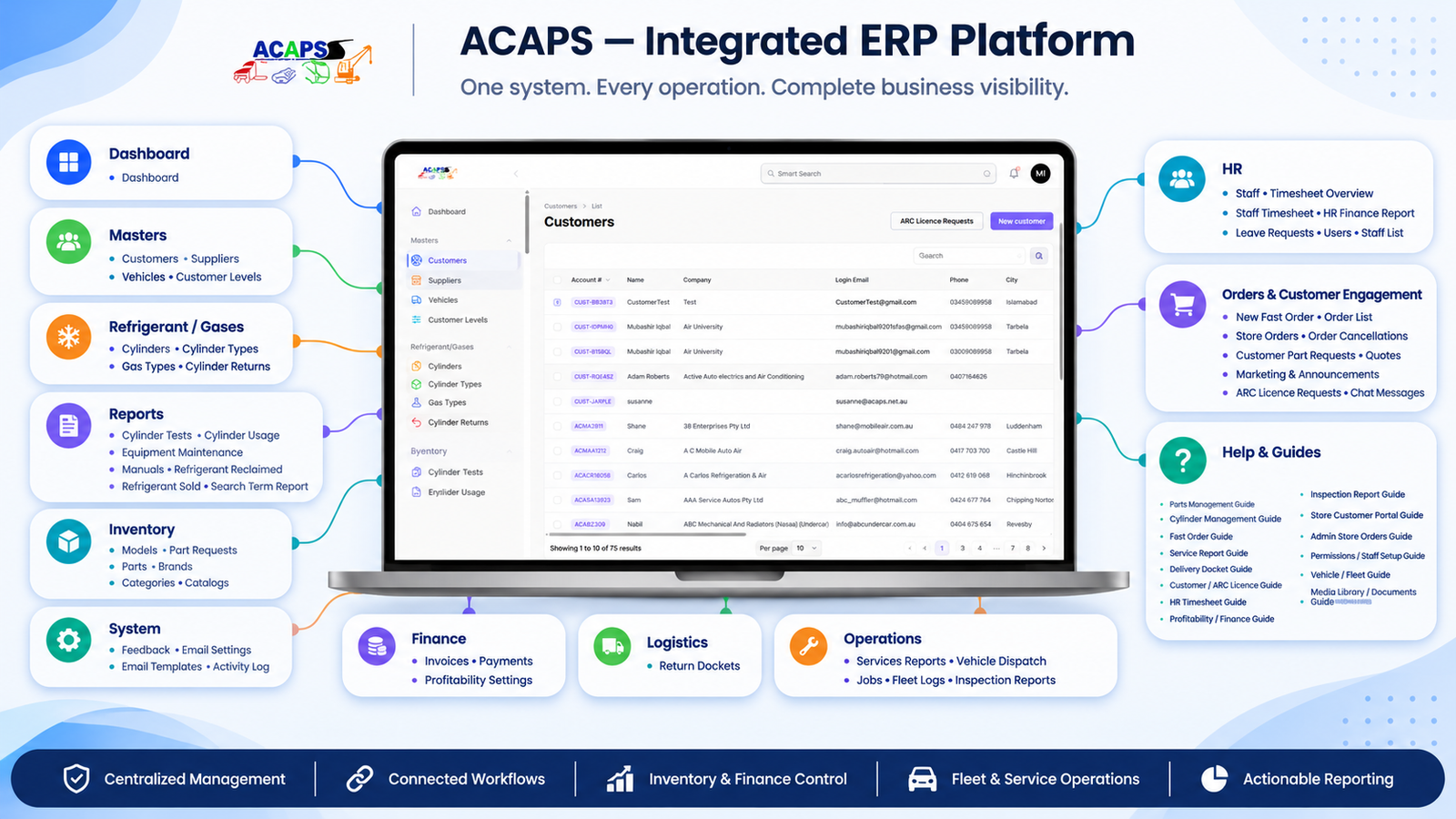
ORVIX₁ is developing a custom ERP for ACAPS Australia, a business that manages fleet service, parts and refrigerant supply, and deliveries. The platform gives office staff, field technicians, warehouse teams, drivers, and customers their own ways to work with the same business records. A customer order can be reviewed and fulfilled in the ERP, and a service visit can be traced from the vehicle inspection through the work performed and the cost of the job.
The business challenge
A service job can involve a vehicle, several technicians, parts from different stock locations, and refrigerant cylinders that must be tracked individually. The office needs to know what the technician did, the warehouse needs to know what stock moved, and finance needs to know which hours and materials should be billed. ACAPS needed a system that could keep those details connected while giving each team a clear view of the work it owns.
14 core ERP modules
These modules cover the main workflows documented for the ACAPS project.
- Vehicle and fleet management. Maintains company and customer vehicle records, staff assignments, and vehicle stock. Technicians can see which parts are available in a service vehicle before arranging a warehouse pickup.
- Vehicle inspections. Records findings by component, with severity levels, photos, and videos. Customers can respond to individual findings, and staff can use approved work to prepare a job, quote, or service follow-up.
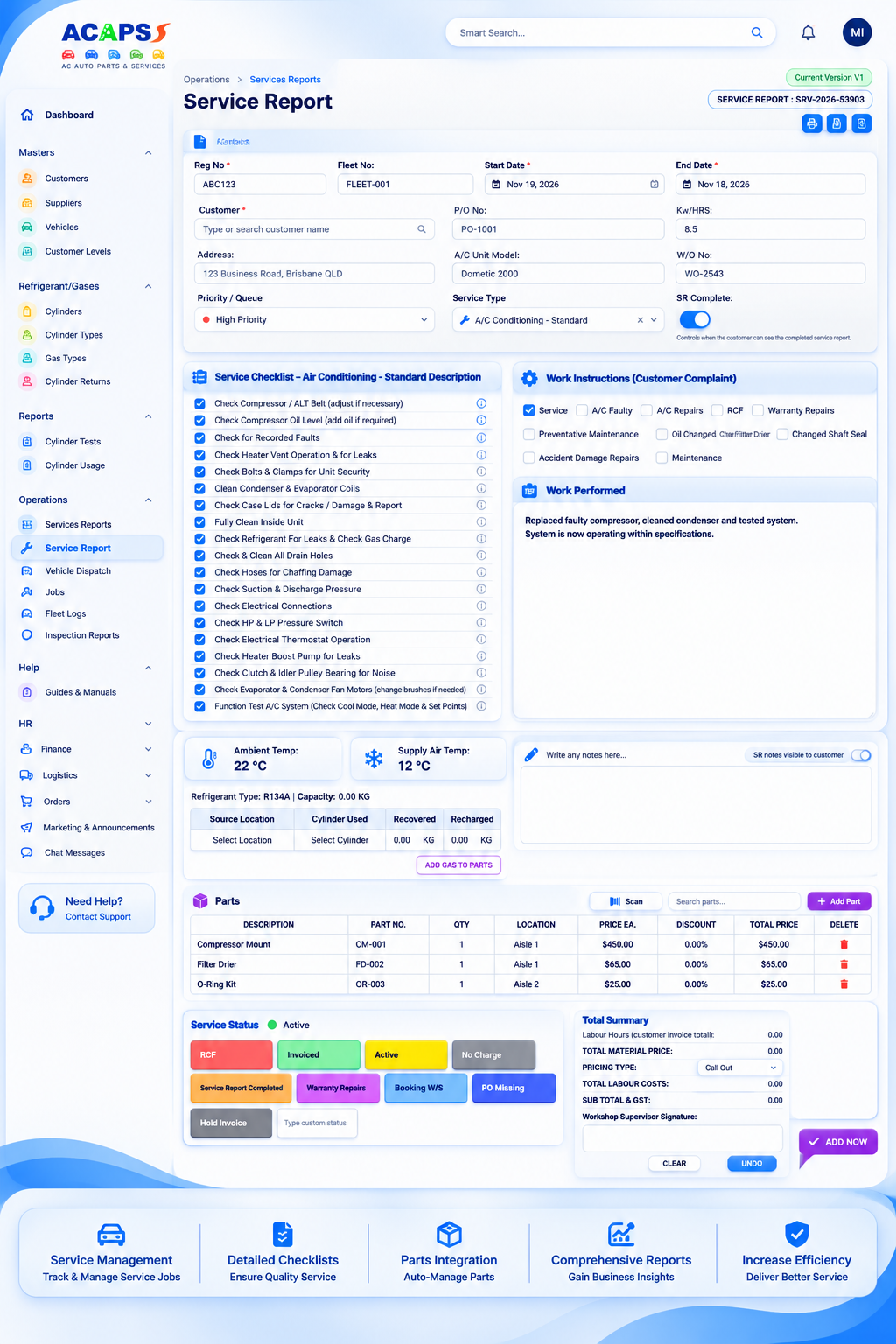
- Jobs and service reports. Captures service checklists, work performed, parts, refrigerant, and technician hours against the relevant customer and vehicle. Administrators can review the report and adjust billable time.
- Parts and warehouse inventory. Manages part numbers, barcodes, stock levels, reorder thresholds, and stock locations. Parts records can also include compatible models, assemblies, and product datasheets.
- Refrigerant and cylinder management. Tracks physical cylinders by serial number, with records of leak tests, current location, transfers, and returns. Staff can follow a cylinder between the warehouse, a vehicle, and a customer.
- Fast Order. Lets authorised staff raise orders for parts and cylinders from the ERP. Staff can check warehouse or vehicle stock and choose delivery, customer pickup, or direct handover.
- Online order administration. Gives office staff a place to review store orders, approve item quantities, process cancellation requests, and follow delivery progress. The customer can receive updates as the order moves forward.
- Delivery dockets and proof of delivery. Records what was actually delivered, including partial deliveries, customer purchase order references, and cylinder serial numbers. Drivers can capture a customer signature at handover.
- Customer portal. Lets approved customers browse products, order online, track orders, request quotes or parts, and review inspection reports from their account.
- Customer and ARC licence approvals. Supports customer account reviews and Australian Refrigeration Council (ARC) licence requests. The ordering workflow checks the customer’s approval status for restricted cylinder purchases.
- HR, timesheets, and leave. Captures clock-ins, breaks, overtime, and leave requests. Staff can request corrections for review, and actual worked hours are kept separate from hours billed to customers.
- Finance and job profitability. Compares service revenue with labour and material costs. Finance can review job margins, labour cost details, parts costs, and write-offs using the recorded service data.
- Staff accounts and permissions. Gives office staff, technicians, warehouse users, and drivers access to the screens and actions relevant to their roles.
- Media library and documents. Stores manuals, catalogues, and supporting files. Staff can link documents to parts, jobs, and service records and control who can view them.
How a service job moves through the ERP
A technician inspects a customer vehicle and records which components need attention. The customer reviews the findings, and approved work can move into a quote or job. When the technician completes the work, the service report captures the parts and refrigerant used along with time spent. The office can then review billable hours, and finance can see the labour and material costs behind the job’s margin.
What this gives ACAPS
Warehouse staff can trace stock to a location, drivers can record exactly what was handed over, and office teams can follow up on a job using the same records that technicians entered in the field. Customers can review inspections and track orders through the portal. ORVIX₁ continues to refine these workflows as the project develops.